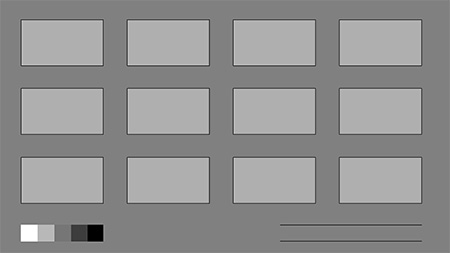
This post could be quite short.  The title says it all.  But I want to elaborate with some of my personal experience, and share some links to well written blog posts on this deceptively simple aspect of illustration: thumbnail sketching.  If you're not familiar, I'm talking about the quick preparatory sketches created before an illustration.  Varying in style from artist,  the only constant with thumbnails is that they are planning images. Often crude and loose, they serve to collect your thoughts and make composition decisions. 

My Struggle With Thumbnail Sketches

A proper illustration, concept design, or graphic layout begins with 20 or more thumbnails.  This forces you to try a variety of options and eliminate all but one.  Ever since I made the switch to a digital process, I've found myself  occasionally skipping the thumbnail sketching phase of my illustrations.  Not always, and not for any particular reason - it's just been happening recently.  The real danger that I've discovered is wasted time.  It might seem like I can save time by skipping an entire portion of the illustration process, but the net result (more often than not) is an illustration that's hit a 'dead end'.  A dead end is when I realize my composition is broken, but I've already spent hours and hours working on specifics: anatomy, rendering, texture, etc.  A dead end painting is often not worth fixing, and a totally fresh start has better odds at solving the visual challenge.  

Something Missing

I've explored the possible reasons for skipping thumbnails, and my best explanation is that digital art is 'fluid'.  There's no fundamental divide between lines and paint - just a few keystrokes.  A small image can be turned into a large image just as quickly.  What this means for me is the temptation to transition from a 'thumbnail' straight into the final image simply by opening 'image size' and adding more resolution.  This method has its positives, but it eliminates a potentially critical step from the natural media process: review.  When I used to make large pages of thumbnail sketches in a sketchbook, I was forced to look at all of them next to one another and select the best one.  Next I would enlarge this image (usually manually) onto high quality paper and begin the tight pencil sketch.  I always thought of this process as a nuisance, one streamlined through the digi-ficaiton of my workflow, but now I'm not so sure.  

A New (Old) Approach

My new idea is to go back to the old way.  Not necessarily with paper and pencil, but with the same fundamental concept: lots of ideas generated quickly.  Since Photoshop is my medium, I'll need to figure out a way to keep the spontaneity found in 1.5"x1" pencil drawings.  The primary main problem with my digital thumbnails, historically, is a tendency to over-polish.  My new (old) approach will combat this problem by focusing on a short list of guiding principles:

Quantity.  At least 20 images, ideally all on a single page.
Simple Media.  To keep my ideas flowing, I'll limit the tools to a single brush and single eraser.
Work Small.  Drawing physically small on-screen might help me avoid overworking them.  No zooming in.
B & W.  Even though I love color, I'll keep that for the second phase of the process.  

Composition Basics: Sketching thumbnails-  by Dan dos Santos Dos Santos is an amazing cover illustrator (you've surely seen his work), and does a great job articulating his digital thumbnail process in this article.  I especially like his artificial limitation of '4 gray-scale values'.  

The Thumbnail!  By Jon Foster - Another amazing illustrator, and if you've seen his work it all seems effortless.  This post exposes all of the planning and scrutiny that leads to such dynamic final paintings.   It all starts at 1.5" tall.  

Part 4: Pteranodons / Hatchling Sketches - By James Gurney - The only thing I love more than Gurney's work is his thought process.  His blog is a gold mine of insights, and this article on the thumbnail / art direction process will not disappoint   

Tips From Other Illustrators

Clearly this is an important issue, and my mistakes should not be your only study materials.  To the right is a list of fantastic articles on the subject, created by a variety of working artists.  If you know of any other blog posts on the subject of thumbnails, please post them in the comments!  

The Bottom Line

Thumbnails aren't beautiful, but they are critical.  Every time I spend my time with them I'm pleased with the final painting.  If you're new to illustration now is an important time for forming good habits, so please - please - make thumbnail sketching a part of your routine.  

Posted
AuthorMatt Kohr
5 CommentsPost a comment

Concept artists and illustrators have the exciting job of translating their imagination onto the canvas or computer screen.  How wonderful!  It's great up until the moment you realize that you don't actually know much about the subject you're supposed to be inventing.  After all, concept artists and illustrators are not architects, fashion designers, industrial designers, or engineers.  They're a mixture of all of these professions- and yet are infrequently trained in any of them.   So if you're an artist, it's up to you to learn a bit about each of these fields.  Let's start today!

Buildings and the Principles of Design

College was the start of my love affair with architecture.  I never had a particular interest until I began to see the overlap with 2D, graphic, design principles.  A building, after all, is just a large geometric shape.   It has a silhouette, rhythm, repetition, emphasis, balance... it's all there!  

Wanting to know more, I began to watch movies and read books.  Concise Townscape was the first book that really hit home.  This book dissects urban spaces into visual design elements - much like a graphic design text would explain visual compositions.  The coolest part is that it opened my eyes to this invisible world of visual flow in cities.  Want to make a viewer focus on something really cool?  Make them walk up a set of stairs and then proceed through an arch or tunnel.  The first thing they see upon exiting will be visually impressive.  Simple principles like this were amazing insights to the way I experience cities, and in the way I design buildings for video games.  Even if I don't have the skills to be an actual architect, understanding the fundamental concepts makes me a better concept artist.


Inspiration

As I learned more about the design language of architecture, I started watching movies for inspiration. If you have netflix streaming, make sure to check out Urbanized (or the direct link here) and How Much Does Your Your Building Weigh, Mr. Foster? (Direct link here).  These are amazing looks at both individual buildings (Foster) and entire cities (Urbanized).   Museums are another great place to learn about the subject - especially the National Building Museum which is not to be missed next time you visit Washington DC.

The list of resources is endless.  If you have any particularly cool websites or books to share, please -- put them in the comments!  Ultimately, the important thing is to never stop learning.  I didn't think architecture was interesting until I started digging, and now I consider it one of my passions.  If you approach tangential subjects such as industrial design, fashion, advertising, and landscaping - you never know what passion you might uncover.  And as a concept artist or illustrator, you can never know too much! 

A quick list of recommendations

  1. Concise Townscape
  2. Architecture: Form, Space & Order
  3. A Shelter Sketchbook
  4. Why Buildings Stand Up
  5. Eames: The Architecht and The Painter
  6. Urbanized

Posted
AuthorMatt Kohr
12 CommentsPost a comment

We've talked about the principles of design - and as you know by now, these are guidelines for organizing the information within a single composition.  The same concept applies when you're working with more than one piece of information, more than one painting, and need to guide a viewer's eyes through the content.  The video in today's post shows the design process for my personal portfolio site - explaining the my layout choices and why I scrapped each one leading to the final composition.  

Arranging Objects, Large and Small

Information design is necessary when you're trying to clarify something to your audience.  For instance, navigating an airport is a information nightmare: everyone is rushing, and no one is familiar with the layout.  As a result, the designers tasked with creating signage have an important task.  They are trying to prevent people from getting lost, and are forced to compete with a barrage of noise, sound, and crowds.  Next time you're in an airport, though, you'll notice that they did a pretty good job: signs are large and visible, often written in multiple languages.  The signs are placed where they're the most likely to be seen, and they are generally surrounded by negative space or blank walls.  Visual tricks to draw the reader's attention, just like the 2D principles of design.   In fact the more you look into the subject of information design, the more overlap you see with the 2D principles of design.  It turns out these guidelines aren't limited to arranging objects within a canvas, they are used to arrange nearly everything.  

Apple: Information Kings

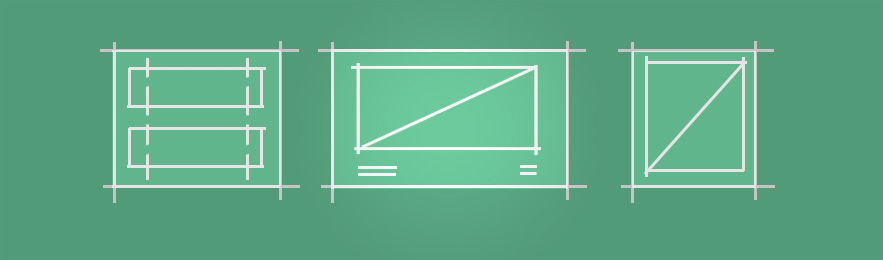
Even though I'm a PC user, I can't help but admire the way Apple advertises their products.  They understand the importance of an information hierarchy, and it's evident by looking at this diagram (right).  I've taken screenshots of the entire vertical scroll for their iPhone 5 website, and stiched them together.  Next to this image I created a diagram simplifying the use of photos and major layout elements into solid color rectangles.  See the shape?  It's like a funnel.  It starts big and bold, and as the reader continues through the piece it gets more and more specific.  The images get smaller and smaller as minute details are explained.  It's an information hierarchy.

Does Your Portfolio Need an Information Hierarchy?

As I discuss in the video, there was a lot of thought that went into the main page layout for my portfolio.  What I didn't say, though, is that my old portfolio didn't even have a main page.  Until recently I limited my website to only my dozen best paintings.  The portfolio section was... the entire site.   And if you're just starting out, I'd recommend this school of thought.  Until you've been working for a few years, it's unlikely that you'll have enough work in total to need an information hierarchy like mine.  My site has upwards of 50 paintings, and those are selected out of a much larger total grouping.  As a result, though, I couldn't get away with a single page website any longer.  For the sake of my audience, I needed to put a road-map for the content and make the general groupings more obvious. 

As the internet becomes more and more cluttered with content, art and otherwise, you'll need to compete harder for attention.  In this environment, knowing how to control a viewer's attention and gaze is crucial.  Are you considering your personal information hierarchy?

Posted
AuthorMatt Kohr
10 CommentsPost a comment

Writing is a topic I've never covered on Ctrl+Paint, but it's time to broach the subject.  I hope you won't be mad when I tell you that your writing could be... better.  Based on the thousands of emails I've received from Ctrl+Paint readers it's safe to generalize:  you guys aren't prioritizing writing.  I'm not telling you this as an insult, but because you probably won't hear it from employers.  Since we are all competing for attention, your skill with words is nearly as important as your skill with a paintbrush.  This video explores the art of writing email.  The importance of structure, editing, and most importantly brevity are often overlooked by 'visual communicators', but it's worth your while to practice these skills.  

When in doubt, say less.

Posted
AuthorMatt Kohr
17 CommentsPost a comment

I have a google alert set to notify me of me newly posted 'digital art tutorials', and it routinely frustrates me.  Every time I see a blog post with a title like '40 Amazing Digital Painting Tutorials' I want to pull my hair out.  It's not clear when this trend started, but the results are obvious: beginners are being mislead.  Art technique is hard, and takes years to learn.  A simple look a DeviantArt or Youtube video comments reveals that beginners aren't satisfied with their painting skills and have no idea why they aren't improving.   It's totally reasonable that they feel this way, in my opinion, because the internet presents digital painting as an easy skill to master.   In reality, it's not!  Art is hard work.   More specifically, it's both technical and mechanically challenging.  First, watch the short Ira Glass video to the right - it's a fantastic bit of advice.  Now let's consider the process of learning to digital paint in two major parts, and where the internet tends to shortchange beginners. 

The Technical Side

You might think that learning to digital paint is like learning to make other digital files - it's both technical and rule driven.  So the web ought to do a great job at teaching this - after all, learning things like HTML, video editing, or making podcasts are very well documented by online tutorials.  But it doesn't.  This mode of thinking leads to project-based tutorials like "paint a flaming eyeball" and "create stunning concept art robots" (in case you're wondering, those are fake names) which lay out a series of steps to follow in order to make a specific final result.  This teaches the software part, but it completely glosses over the most important piece: painting. Digital painting, after all, is essentially just.... painting.  So if you're feeling frustrated about your results, ask yourself: how are your traditional skills?  This leads me to the second half of the equation.  

The Mechanical Side

Painting and drawing use finely-honed motor skills.  Just like playing a sport, you can understand the rules in a half hour -- but that doesn't mean you can play professionally.  The only way to improve is through repetition.  Practice, and practice, and practice, and your technique will improve.  This is the void left by the internet. When was the last time a Youtube speedpaint video talked about years and years of practice?  Practice isn't sexy.   But it's an undeniable truth, and you'll be a happier artist if you're prepared for a marathon, not a sprint.  Even as a professional concept artist I am learning every day, and plan to hone my craft for generations to come.  It's not a fast process.  Like Ira Glass describes in the video (above), there's going to be a gap between your current skill and your current taste.  The real challenge is coming to terms with this struggle, because you're going to feel if for a long time.  You're going to feel it for years.  Hopefully, you'll feel it (in some small way) forever -- because there's always more to learn.

Help Change the Conversation

The internet brought us all together.  Even if much of the training content available glosses over the value of traditional drawing and dedicated practice, it brought a bunch of artists together from all over the world to start a conversation.  That's extremely cool.  We're all learning, and we're all in this together.  Since you'll have opportunities to give feedback to artists with less experience than you, remember to encourage the value of  'foundation'.  If you see someone struggling with their digital painting, ask them how often they practice drawing with a pencil.  See a beginner overly concerned with the particulars of photoshop, or which tablet to buy?  Remind them that drawing in correct perspective is far more important.   Ultimately, the most important part of 'digital painting' is not 'digital'.  So let's help change the conversation.  Art is supposed to be hard work. 

Posted
AuthorMatt Kohr
27 CommentsPost a comment

There is more than one way to light your scene. What is your lighting adding to the story? This video introduces some of the psychological implications of typical lighting setups. In fact, it's common for beginners to ignore lighting completely, rendering forms in a generalized way. As you progress as an artist, however, you'll need to harness the narrative power of light and make it work for your compositions -- not against them.  

Imagining light

If you're not painting from observation, light is even more important.  It's often obvious in beginner work that the artist does not have a strong grasp on the principles of light, because their imagined spaces are flat and confusing.  For this reason, light is one of the five categories I explore in the newly launched "Observation to Imagination".   I've always been a huge fan of light and it's power for storytelling, and luckily the new premium series gave me an opportunity to explain my approach.  

Mood & Light

The painting below is very loose and painterly, but the mood is set elegantly with a bit of intentional lighting.  In this case the deep shadows are deep and atmospheric, allowing the artist to use implied detail instead of extreme polish.  More than anything, Atack is revealing just enough of the scene to activate the audience's imagination - and he's doing it with intentional lighting.  

These two images to the right are painted by the same artist: Dorje, and each has a very different mood.  Once again, it's not an overwhelming use of polish or detail used to tell a story in these pieces... it's light.  Light used carefully and intentionally.  Beginners often add light as an afterthought, overlooking the massive impact it has on the mood of an image.  Instead, one might consider the light and color palette before even designing a composition - letting mood drive the piece instead of objects.  When was the last time you started a painting by choosing a lighting situation?

Ultimately, painting light is.... just painting.  Some painters would argue that there is nothing else.  It's a lifetime pursuit.  In my opinion, though, it's a constant source of beauty - and worth the challenge.  If you're looking for books specifically aimed at this topic, I highly recommend "Color and Light: A Guide for the Realist Painter".  It's written by James Gurney, and does a wonderful job simplifying a complicated subject.  

I hope that you already love light as much as I do.  But if you don't,I encourage you to spend this week looking at paintings with one thing in mind:  light.  How are they using it? What is it telling about the mood?  Why have they decided to use shadows?  In a good painting, none of this is arbitrary.  Have fun studying!

Fortress of Summer, Dorje  (click to enlarge)

Highland Gap, Dorje (click to enlarge)

Art trade

I've just listed a couple of my recent favorites here, but there is a whole world of other artists using light to their advantage.  In the comments, I'd love to see a list of your favorites so we can all trade influences and enlarge our inspiration folders.  

Posted
AuthorMatt Kohr
CategoriesUncategorized
19 CommentsPost a comment

Weekly Workbook #001

As of this writing, I've seen about a dozen entries in the the current weekly workbook challenge: “Stylish Monsters”. So far, they're great! For those that haven't heard about it, I'm providing weekly drawing activities at the Ctrl+Paint Facebook page, and everyone is invited to participate. This blog post is going to take a look into my motivation for this particular challenge, and how the principles apply to a much wider range of subject-matter.

Observing the rules of style

Join in!  Everyone is invited, so to get started:  Upload it to the facebook wall or add it to the Flickr goup.

When you carefully observe a still life, the challenge is to mimic realism. When you carefully observe a stylized illustration, your goal is the same: to mimic what you see. Surprisingly, the most important skill when working with existing styles is knowing how to see. To test this, I assigned creating monsters in the style of “Monsters Ate my Birthday Cake” which has a very simple set of rules. Looking at these designs you can see that shape is priority #1, and that all of the edges are hard. Next, you'll notice that there are no outlines at all, even though it is a 'cartoon' style. You'll also notice that the colors are either totally solid, or use a slight gradation. Finally, there are small details used to add character and indicate material such as scales or tufts of fur.

How did your monster compare to these rules? Looking at the current submissions, there's a range of accuracy. Some nail it, while others missed some of the rules. If you haven't tried yet, I encourage you to enter your own! You can post your submissions on the Ctrl+Paint Facebook wall, or in the Weekly Workbook Flickr group.

Design vs. rendering

Designing the shape of a monster is totally separate from creating an illustration of that monster. Thumbnail sketches, for instance, capture a lot of information about a drawing though are not very detailed. The same goes for creature design. Below you can see two of my paintings: on the left is my example for Stylish Monsters, and on the right is the same design painted in a much more realistic style. They look very different at a first glance, but note that the shapes are essentially the same on both versions. The only thing that changed is the style with which I decided to depict it in my final painting.

My example artwork for the Weekly Workbook

A slightly modified version of that monster, placed into a composition

My final piece is done in a very different style, but the design is essentially the same as my original.  (click to enlarge)

Why is this important? Because it takes much longer to paint the image on the right. If I want to design a creature, it's much more effective use of my time to make simple drawings to test out shapes and ideas – even if they look more cartooned like the image on the left. Thumbnail sketches, design sketches, and doodles contain a vast amount of information – it just needs to be 'resolved' by the artist. So making a final illustration is somewhat like unpacking the visual information contained in a sketch and giving it a final coat of polish. In short, be creative with sketches and save your polish for the successful ideas. If you want to learn more about this concept, Design Basics is available in the Ctrl+Paint store.  

The value of versatility

Artists often ask me "should I pick a style?".  Though there's not a one-size-fits-all answer to this, my experience has been that versatility is useful in the commercial art world.   At a single game studio, I worked on kids games and adult games - with very little time in between.  Staying flexible made this possible.  With this in mind, my advice is to practice a wide range of styles.  

But remember: they're all based in your ability to paint realistically... so you have to start with a solid foundation.  So keep working on your still life paintings!

Posted
AuthorMatt Kohr
8 CommentsPost a comment

Which would you rather have: five mediocre things or two things you really love? In theory I prefer the two, but I often choose the five mediocre ones out of habit. Because we're on the internet, it's extremely easy to have everything. And though this might seem great at face value, it can be deadly to your creativity. When was the last time you bought an art reference book and read the entire thing? In a digital age where it's really easy to get stuff, sometimes we overlook the benefits of getting rid of stuff. Let's take a look at this idea in the big picture first, and then in terms of creating artwork.

Prioritize your activities.

In "Focus Your Time" I talk about getting more done by doing fewer things. It might seem obvious, but it actually takes a constant effort to stay on top of this concept. One of my challenges is being a gamer. I really enjoy playing video games, but have recently decided to cut out console gaming and limit myself to handhelds. Though it was a hard choice, it's allowed me to spend more of my time on creative pursuits, without completely eliminating the fun of gaming. What can you cut out of your schedule?

Limit your options.

One of the most common questions I get from you guys is about creativity. Specifically, it's about feeling a lack of creativity. In reality you might just be suffering from option-overload. A blank canvas is the ultimate open-ended question, which can stop many artists in their tracks. Can't think of what to draw? Limit the scope. In “give yourself assignments” I talk about pretending to be an art director for your own personal work. Random generators are another great opportunity.

Limit your colors.

Some of the most engaging paintings use color as a beacon – not as an overall barrage. See how this Tron painting by Vyle draws your attention to the focal point? This recognizes the power of restraint and the use of negative space to empower the subject. It's all about relativity: 'bright' is only possible when surrounded by 'dim'.

Cut the visual clutter.

It's easy to assume 'more realistic' means 'more detailed', but that's almost never the case. If an image is clear, it doesn't need much visual information to tell a big story. Storyboards are a great example of this efficiency in action. These great sketches from How To Train Your Dragon prove you don't need photo-realism to get the point across. Even though you are able to add details doesn't mean you should. Just like with color, use detail sparingly.

Another great example of this principle is the work by Sparth.   If you follow the game industry, you've probably seen his designs.  The cars for Id software's Rage proves that he's more than capable of detailed imagery (below left), but many of his illustrations like the one on the bottom right make wonderful use of selective focus.  The spaceship is very detailed, though the background is left atmospheric; activating the viewer's imagination.  

Subtract everywhere.

As I've shown, eliminating the unnecessary is a great way to highlight the good stuff. In fact, I'm experimenting with this as a personal creed. In an attempt to make better art and get more out of my time, I'm on a constant hunt for things to eliminate.  So let's talk about it in the comments...What can you cut?

Posted
AuthorMatt Kohr
20 CommentsPost a comment

New Structure

Each revision of Ctrl+Paint has been a bit different, but I'm extremely excited about the simplicity of the Video Library.  Many of you asked for a list, and you were right: it's a great way to see the big picture!

New Schedule

From this point forward, the new schedule is 1 written post every Thursday.  Tuesday and Thursday took on special meaning for me these last two years, so it's going to be a bit strange switching to a single Thursday weekly post.  That said, you can look forward to much more activity on Facebook and Twitter - so get connected!

Same Goal

I want to teach you to digital paint, plain and simple.   The page is still totally ad-free, and my focus is on teaching the material as clearly as possible.  I thought it would only take six months to get to this point, but it ended up taking two years - now I'm excited for the next two years!

 
Posted
AuthorMatt Kohr
40 CommentsPost a comment